Money Management
Risk Manager for Binance Futures: How to Set Daily Loss Limits and Protect Your Account
A Stop Loss protects one order. Account-level risk — a daily loss limit, leverage caps, a ceiling on open instruments — protects the whole account. Here is how each layer works on Binance Futures, with a worked $10,000 / 3% example.
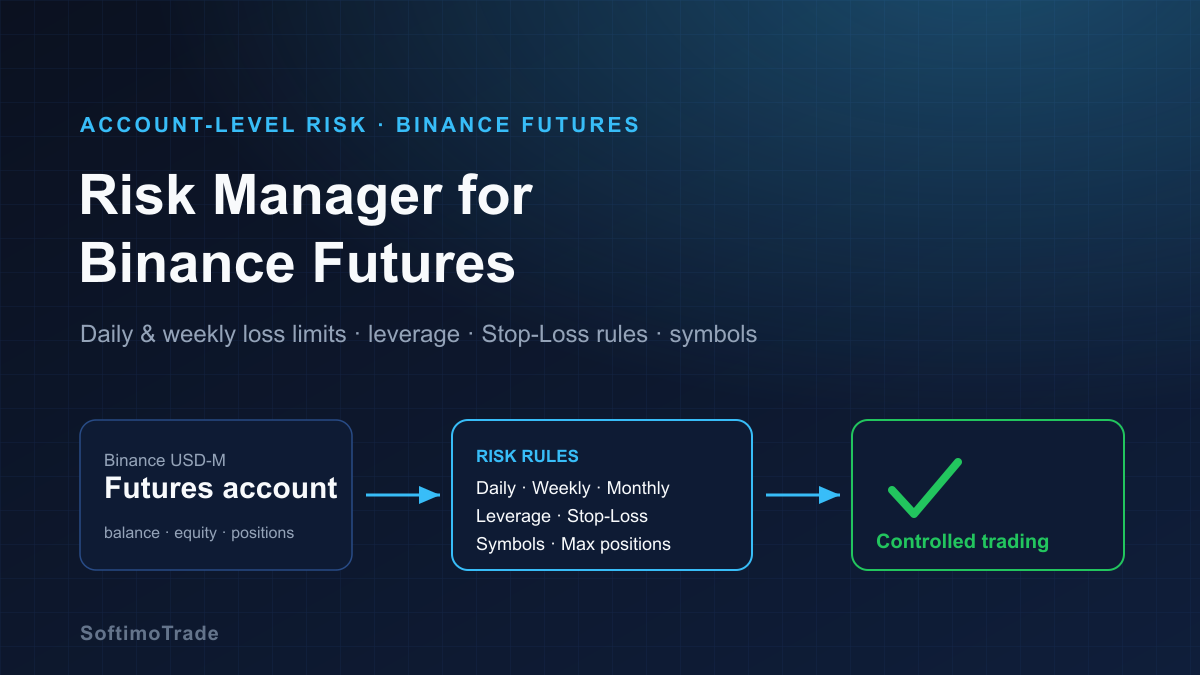
Most Binance Futures accounts are not lost on a single dramatic trade. They erode over one bad day that a trader refused to walk away from, or over a week of "small" positions that quietly added up. A Stop Loss caps the risk of one order — but the account is exposed to everything at once: total leverage, several positions, a run of losses, and the temptation to keep clicking. That gap is what account-level risk management is for.
Short answer: On Binance Futures you can manage risk on a single order with a Stop Loss and Take Profit, but account-level risk needs rules that apply across the whole account. Common controls are a maximum daily loss, weekly and monthly loss limits, a leverage cap, a rule against trades without a Stop Loss, a ceiling on how many instruments are open at once, and blocking new trading once a threshold is reached. Binance provides order-level tools plus features like a Cooling-Off Period and default leverage; a dedicated account-level layer adds persistent, rule-based limits on top. None of it removes market risk — it enforces the plan you set while calm.
What is account-level risk management for Binance Futures?
Risk on a futures account lives on three layers, and they are easy to confuse:
| Risk layer | Example control | What it governs | | --- | --- | --- | | Order-level | Stop Loss / Take Profit on one order | A single order's worst case | | Position-level | Position size, leverage, margin mode on one symbol | One open position on one instrument | | Account-level | Daily/weekly loss limit, leverage cap, max open instruments, trading lock | The whole account — every position and every source of trades combined |
Binance gives you strong tools on the first two layers: Stop-Loss and Take-Profit orders, per-symbol leverage, cross vs isolated margin, and account-wide safeguards such as a Cooling-Off Period and default leverage settings. Account-level risk management is the layer that watches the sum of your activity and enforces the rules you decided in advance — for the whole account, not one order.
Why a Stop Loss alone is not enough
A Stop Loss is essential, but it only answers one question: how much can this one trade lose? Even with a stop on every order, an account can still get into trouble because a trader may:
- open too many positions at once,
- use excessive leverage on one or several of them,
- accumulate a string of stopped-out losses in a single day,
- keep trading emotionally after reaching a planned loss,
- hold several correlated positions that all move together,
- run manual trades and automated tools on the same account at the same time.
Each trade can respect its own stop while the account as a whole drifts far past what the trader intended to risk. A Stop Loss also does not guarantee a fill at the exact level — in fast or gapping markets, execution can be worse than the stop price. Account-level rules exist precisely because the risks above are invisible to any single order ticket.
A daily loss limit: a worked example
The daily loss limit is the cornerstone of account-level risk. The idea is simple: decide, in advance, the most you are willing to lose in one day, and stop when you get there.
Take a $10,000 reference account and a 3% daily limit:
- 3% of $10,000 = $300
- Your daily loss threshold is −$300
- The moment the day's loss reaches −$300, your trading rule fires
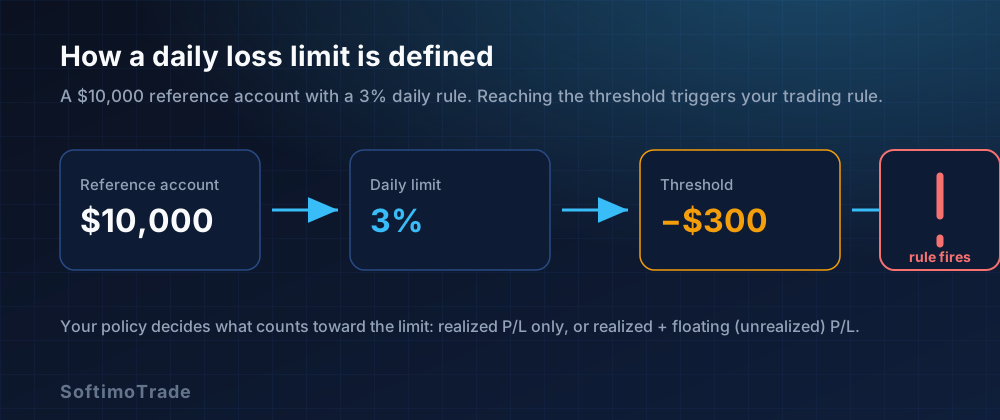
The number is easy; the definition is where care is needed. A risk system must state exactly what counts toward the limit, because these are different figures:
- Realized (closed) P&L — profit and loss from positions you have already closed today.
- Unrealized (floating) P&L — the running profit and loss of positions still open.
- Balance — your account after closed trades only; it ignores open positions.
- Equity — balance plus/minus floating P&L; it reflects open positions in real time.
A limit measured on realized P&L / balance only reacts after you close losing trades. A limit measured on equity (realized + floating) reacts to a drawdown as it builds. Neither is universally "right," and not every risk tool calculates the threshold the same way — so the important thing is to know which one your setup uses before you rely on it.
What should happen after the limit is reached?
Hitting the limit is not one action but a policy you configure in advance. Depending on the tool and how it connects to your account, sensible options include:
- Block new trades for the rest of the defined period — the core purpose of the rule.
- Cancel pending instructions where applicable, so a resting order can't trigger after you have "stopped."
- Preserve or manage existing positions according to your configured policy — some traders leave open trades under their own Stop Loss; others close them.
- Lock trading for the remainder of the day (or week/month) so the rule can't be casually overridden.
Be precise about what any given tool can actually do. A tool that connects to Binance read-only can monitor and alert but cannot place or cancel orders on the exchange; a tool that trades through its own order terminal can block or lock the new entries you place through it, but will not touch positions you opened directly on Binance. Know which model you are using before you assume the limit will be enforced automatically.
Daily, weekly and monthly limits
A daily stop caps a single bad day. A run of "acceptable" days can still hollow out an account, which is why many traders layer limits:
- Daily — the primary circuit breaker (e.g. 3%).
- Weekly — a wider cap (e.g. 6–8%) that ends the week after several rough days.
- Monthly — a drawdown ceiling that forces a review rather than just a pause.
Example: on a $10,000 account, a 3% daily and 8% weekly limit means that after roughly two or three maximum-loss days, the weekly cap stops trading even if no single day breached its own limit. These are discipline rules, not guarantees — they cap how far you let a losing streak run; they do not prevent losses or promise a specific outcome.
Leverage and account-level limits
Leverage multiplies both the size of your position relative to your margin and how sensitive that position is to price. At 10x, a 1% move against you is a 10% move on the margin committed; at 50x it is far more, and liquidation sits much closer to entry. Binance lets you choose and cap default leverage, and there is a difference between the maximum leverage the exchange allows and the maximum you permit yourself.
An account-level leverage rule keeps that self-imposed ceiling consistent — across every symbol and every session — instead of relying on remembering to set it correctly each time. It is one of the simplest account-level controls and one of the most protective.
Positions without a Stop Loss
Modern accounts receive positions from several sources: manual clicks in the Binance interface, API-based tools, and automated strategies. Those sources don't necessarily share the same protection rules, so it is easy to end up with a position that carries no Stop Loss at all — the one trade with no defined worst case.
Account-level monitoring helps by surfacing positions that don't match your own risk policy — for example, an open position with no protective stop — so you can add one or reduce the trade. (Remember that a Stop Loss reduces and defines risk; it does not guarantee execution at an exact price in a fast market.) This is the crypto-account version of a problem MetaTrader traders know well — see how to protect an account from trades without a Stop Loss.
Too many simultaneous positions
Open BTCUSDT, ETHUSDT, SOLUSDT and XRPUSDT, each at a "small" size, and every trade can look reasonable on its own. The account tells a different story:
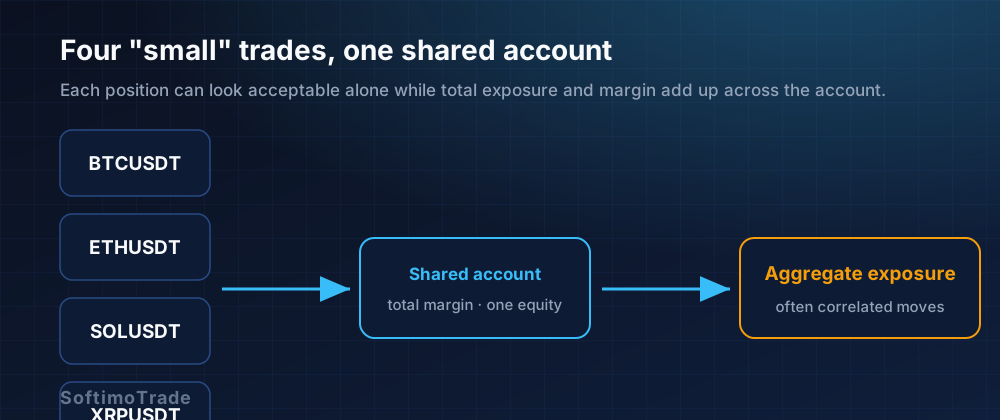
- Correlated exposure — major crypto assets often move together, so four "diversified" longs can behave like one larger long.
- Total margin — each position consumes margin from the same pool.
- Total account risk — the combined worst case can be far larger than any single trade suggests.
A cap on the maximum number of instruments open at once, plus attention to total margin, keeps aggregate exposure inside a level you actually chose. This is the account-level side of risk diversification: more tickers is not automatically less risk.
Discipline and revenge trading
The most expensive decision in trading is when to stop, and it is made at the worst possible moment — right after a loss. A trader reaches the planned daily loss, feels the urge to "win it back," and keeps going. A predefined trading lock reduces the ability to override the rule in that emotional moment, because the decision was already made while calm.
No software can eliminate emotion or guarantee discipline. What a lock does is add friction exactly where willpower is weakest — turning "I should stop" into "I already decided to stop."
TraderVitals: account-level risk management for Binance Futures
Once the problem is clear, the tooling makes sense. TraderVitals is an independent, third-party risk-management platform for Binance USD-M Futures. (It is not affiliated with or endorsed by Binance.) Rather than trying to police your whole account after the fact, it lets you trade through its own Trade Terminal, where each order is checked against the account-level rules you defined first.
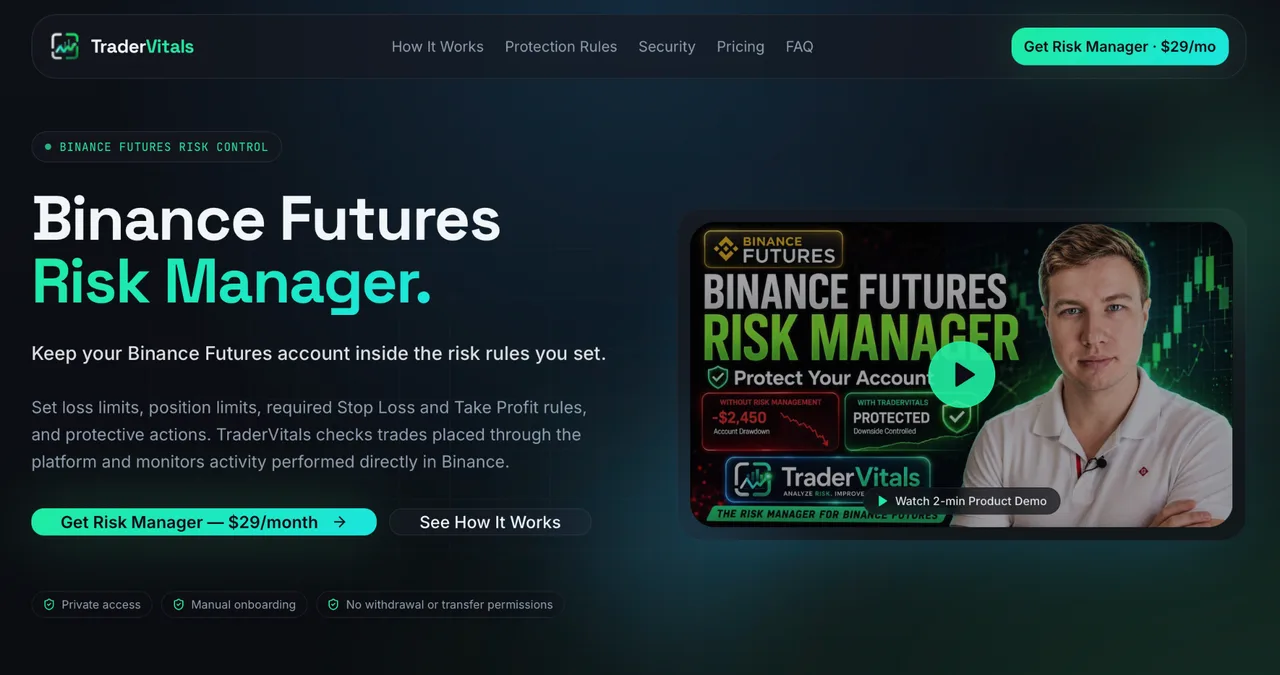
TraderVitals is a standalone risk-management platform for Binance USD-M Futures — an independent product, not affiliated with Binance.
Concepts it is built around include:
- Daily, weekly and monthly P/L limits, expressed in money or as a percentage.
- A Discipline Lock that halts new entries once a limit is reached, for the rest of the defined period.
- Default Stop-Loss / Take-Profit rules and no-Stop-Loss detection, so a trade without protection doesn't slip through unnoticed.
- Leverage controls, symbol restrictions and a maximum-instruments ceiling.
- A Smart Risk Ticket that sizes an order to your rules before it is placed.
- Account monitoring / Trading Health analytics, and preset risk profiles such as Conservative, Balanced and Max Capacity.
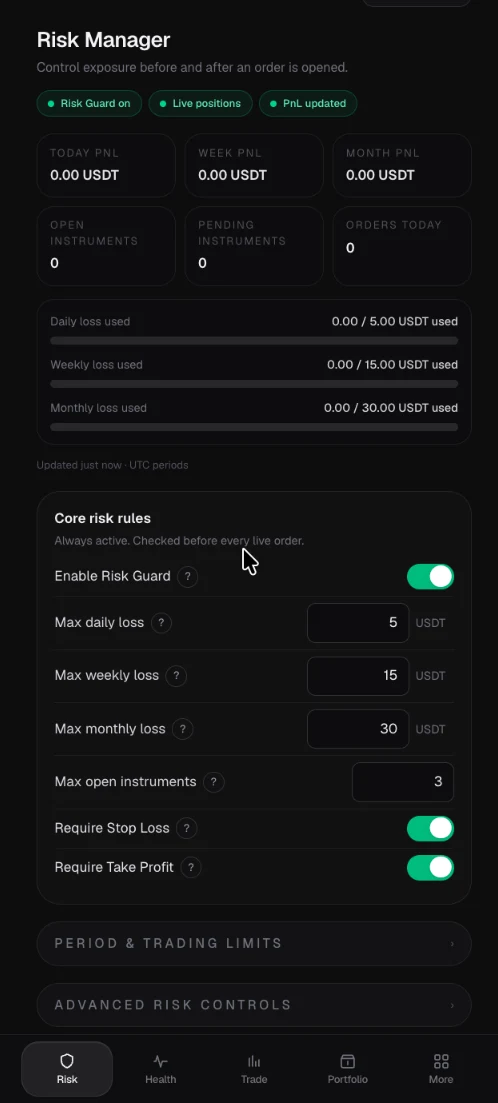
The actual TraderVitals Risk Manager interface: today / week / month PnL, daily / weekly / monthly loss limits, a cap on open instruments, and Require Stop Loss / Take Profit rules.
Because enforcement happens on trades placed through its terminal, TraderVitals can block or lock the new entries you place there once a limit is hit; it does not automatically close or cancel positions you opened directly on Binance. Verify each control against your own setup before relying on it.
TraderVitals draws a clear line between two layers, and it matters for what the tool can actually enforce:
- Risk Guard — before execution. It checks each order you submit through the TraderVitals Trade Terminal against your configured rules and can reject a non-compliant order before it is sent to Binance. This is where a daily-limit or no-Stop-Loss rule is actively enforced at the point of entry.
- Binance Account Guardian — after activity occurs. It monitors positions and orders you create directly in Binance, after that Binance-side activity has already happened, and performs only the protective actions you configured. It cannot prevent the original Buy/Sell click you make inside the Binance interface — that action is detected after the fact, not blocked before it.
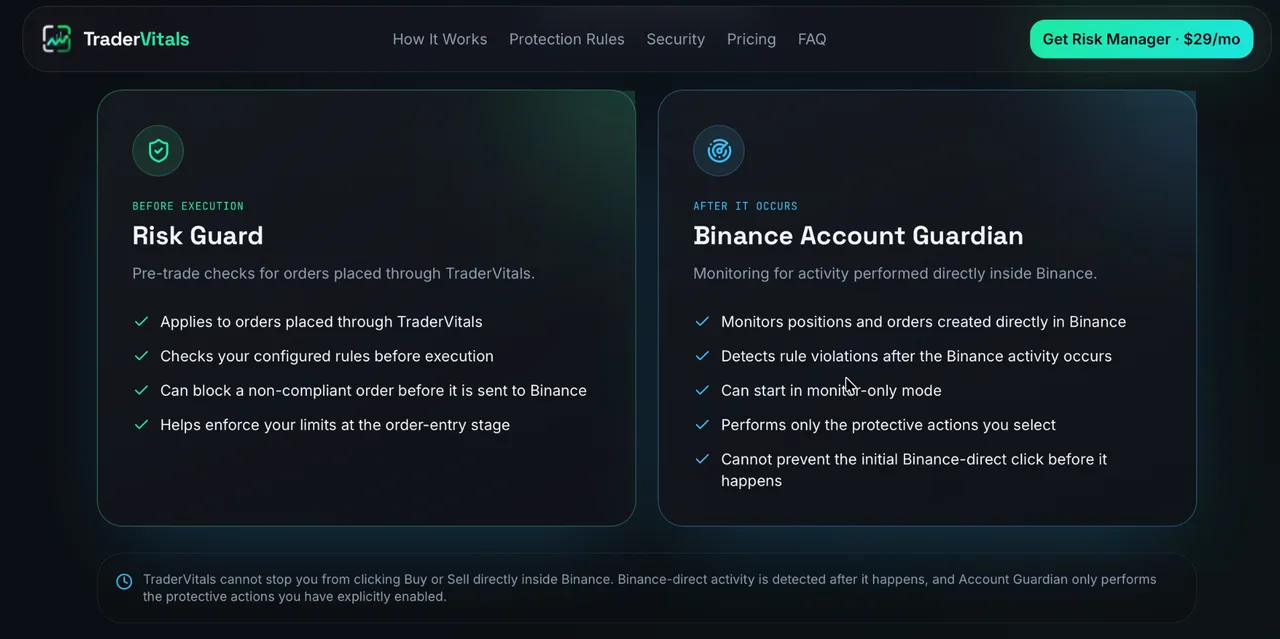
Two layers, two moments: Risk Guard checks orders placed through TraderVitals before they reach Binance; Binance Account Guardian monitors activity you perform directly in Binance after it has occurred.
A useful mental model of the workflow:
Binance USD-M Futures account
        ↓
TraderVitals monitoring / risk layer + Trade Terminal
        ↓
your predefined account rules (daily / weekly / leverage / SL / symbols)
        ↓
allow or restrict the trading action according to your limits
What a risk layer cannot do. It is worth being blunt about the limits so expectations stay honest. A tool like this cannot eliminate market risk, guarantee that losses stay within an exact amount in every market condition, remove slippage, or eliminate execution, API and network risk. It cannot guarantee profitability, and it does not replace understanding how Binance Futures risk actually works. It helps you define and enforce predefined account-level risk rules — nothing more, and nothing less.
Account-level rules vs a single order ticket
A standard order ticket is excellent at what it does and blind to everything else. The value of an account-level layer is the column on the right:
| Control | Single order ticket | Account-level risk layer | | --- | --- | --- | | Stop Loss on one trade | Yes | Yes (and default-SL rules) | | Daily / weekly / monthly loss cap | No | Yes | | Leverage ceiling across the account | Per order only | Yes | | Maximum simultaneous instruments | No | Yes | | Detect positions with no Stop Loss | No | Yes | | Trading lock after a threshold | No | Yes |
This is not a claim about what Binance's native tools lack — Binance provides order-level protection and its own account safeguards. It is a description of the distinct job an account-level layer does: watching the whole account against one set of rules.
SoftimoTrade Risk Manager vs TraderVitals — which is which
SoftimoTrade also builds a risk tool, and the distinction matters because the platforms are different:
- SoftimoTrade Risk Manager → account-level risk management for MetaTrader (MT4/MT5) — an assistant expert advisor that enforces your loss and exposure limits across manual and automated trades.
- TraderVitals → account-level risk management for Binance USD-M Futures.
Same philosophy — enforce the rules you set for yourself — applied to two different markets. If you trade Forex and indices on MetaTrader, the Risk Manager EA is the fit; if you trade crypto perpetuals on Binance, TraderVitals is the equivalent.
Risk Manager
Account-level risk control for MetaTrader (MT4/MT5) — the MetaTrader counterpart to a Binance Futures risk layer.
Binance Futures risk checklist
Answer these before your next session — they are worth doing even without any tool:
- What percentage of my account can I lose in one day?
- Do floating (unrealized) losses count toward my limit, or only realized ones?
- What is my maximum leverage — and is it the same on every symbol?
- How many instruments may I hold open at once?
- Are trades without a Stop Loss ever acceptable to me?
- What exactly happens when my daily limit is reached?
- When does my trading "day" reset?
- Can I override the rule immediately, or is there a lock?
If you want the numbers behind the answers, see how to calculate the exact risk on a trade and how to set a daily loss limit.
Frequently asked questions
Can I set a daily loss limit for Binance Futures?
Yes, as a rule you enforce. Decide the maximum you will lose in a day (a fixed amount or a percentage of the account), define whether it counts realized-only or realized + floating P&L, and stop when you reach it. A risk tool can automate this by blocking new entries once the threshold is hit; a read-only monitor can alert you but cannot place or cancel orders on the exchange.
Is a Stop Loss enough for Binance Futures risk management?
No. A Stop Loss defines the risk of one order, but the account is exposed to total leverage, multiple positions, correlated moves and a run of losses at once. Account-level rules — daily/weekly limits, a leverage cap, a ceiling on open instruments — cover what a single stop cannot.
Can several Binance Futures positions increase account risk even if each trade is small?
Yes. Major crypto assets are often correlated, so several "small" long positions can behave like one large one. They also share the same margin pool and equity, so the combined worst case can be much larger than any single trade implies.
What is the difference between trade risk and account risk?
Trade risk is the loss a single position can produce, usually capped by a Stop Loss. Account risk is the loss the whole account can produce across every open position and every source of trades combined. You manage trade risk with order-level tools and account risk with account-level rules.
Can a risk manager prevent liquidation?
No tool can guarantee liquidation will never occur. Rules like a leverage cap, a daily loss limit and a ceiling on open positions reduce the conditions that lead to it, but market gaps, slippage and extreme volatility mean liquidation always remains possible. Treat any risk layer as a way to enforce discipline, not as a guarantee.
Sources and further reading
- Binance — Responsible Trading (leverage, default settings, safeguards): binance.com/en/futures/responsible-trading
- Binance Support — How to Improve Risk Management on Binance Futures: binance.com/en/support/faq
- TraderVitals — risk management for Binance USD-M Futures: tradervitals.com
Set the numbers while you are calm, decide what happens when a limit is reached, and let the rule do the hard part in the moment. Explore TraderVitals →