Money Management
How to Protect an MT5 Account From Trades Without Stop Loss
An unprotected position is a trade with no defined worst case. Here is how an account-level guard finds positions without a stop loss, tells a temporary state from a real gap, and either adds a default SL or closes the trade.
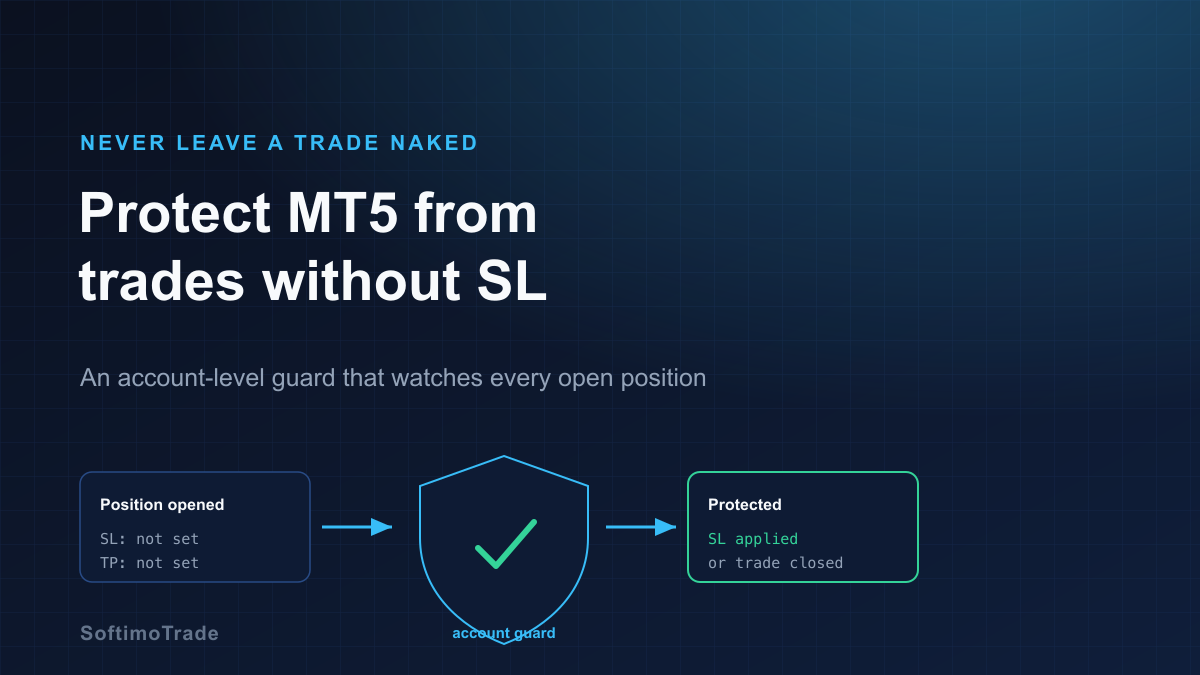
A stop loss is the only part of a trade that defines its worst case. A position without one has no floor: its maximum loss is "whatever the market does next." One naked trade left open through a news spike or a weekend gap can undo weeks of careful trading. When you run several strategies — some manual, some automated — spotting these positions by eye is unreliable. An account-level guard does it continuously.
Short answer: To protect an MT5 account from trades without a stop loss, run an account-level guard that scans every open position and checks whether each has an SL. When it finds an unprotected position, it can add a default stop loss (calculated by distance or by risk) or close the trade, according to your rule. A good guard distinguishes a temporary no-SL state — the split second between opening a trade and attaching its stop — from a genuinely unprotected position, so it does not act on trades that are about to be protected anyway.
Why a position without a stop loss matters
A stop loss converts an open-ended risk into a known, capped one. Without it:
- The worst case is undefined. The trade can lose far more than you intended.
- Gaps ignore your intentions. Markets can jump over prices on news or the weekend open; a trade you "meant to watch" can gap deeply against you while you are away.
- Leverage amplifies it. A naked position on a leveraged account can threaten the whole balance, not just that trade's budget.
- It compounds across strategies. One unprotected EA plus one forgotten manual trade is two open-ended risks at once.
Temporary no-SL vs genuinely unprotected
This distinction is what separates a helpful guard from an annoying one. Not every position lacking an SL right now is a problem:
- Temporary (normal). Many EAs open the position first and set the stop loss a moment later in a second step. For a brief instant the trade has no SL by design. Acting instantly would fight the EA and could close good trades.
- Genuine (dangerous). A position that stays without an SL beyond that brief window — a manual trade where you forgot the stop, or an EA that never sets one — is a real, open-ended risk.
The practical fix is a short grace period: the guard waits a few seconds before treating a no-SL position as unprotected, giving well-behaved EAs time to attach their stop. Only after the grace window does it act.
Where unprotected trades come from
- Manual trades. You open a position quickly and forget the SL, or intend to add it "in a minute" and get distracted.
- External or third-party EAs. Not every robot sets a stop loss; some rely on internal logic that never places a hard SL on the server.
- Signal copiers. If the source signal omits an SL, the copied trade arrives without one unless you enforce a default.
- Partial edits. A management action removes an SL (e.g. a botched modify) and leaves the trade exposed.
Because these sources are independent, per-strategy discipline is not enough — the gap is at the account level, where a single guard can watch them all.
What the guard should do when it finds one
Two main responses, chosen in advance:
- Add a default stop loss. The guard attaches an SL to the naked position. It can be set as a fixed distance (e.g. N points from entry) or by risk (a distance sized so the trade risks no more than X% / $Y). This keeps the trade alive but bounded — usually the preferred outcome.
- Close the position. For a stricter policy, the guard simply closes any trade that remains unprotected past the grace period. Blunt, but it guarantees no open-ended risk survives.
Many traders combine them: try to apply a sensible default SL, and close only if the stop cannot be set.
Interaction with multiple EAs
When several EAs share one account, the guard must respect ownership. Two cautions:
- Don't fight an EA that sets its own SL. The grace period handles the normal open-then-protect sequence. If a guard were too eager, it could interfere with a robot mid-operation.
- Do cover trades no one protects. Manual entries and external EAs that never set an SL are exactly the ones a per-EA setting cannot reach — the account-level guard is their only safety net.
False positives and situations that need care
A guard is a safety net, not a strategy, and there are edges to respect:
- Grace period too short → it acts on trades that were about to be protected. Too long → real exposure sits open. Tune it to how your EAs behave.
- Strategies that legitimately manage without a hard SL (e.g. logic that exits on a signal). If you run these deliberately, exempt them by Magic Number rather than forcing an SL that breaks their logic.
- Applying an SL too tight in volatile conditions can stop out a trade on noise. A risk-based distance is safer than an arbitrarily small fixed one.
- The guard is not a stop loss substitute during a gap. If price gaps past the level, the fill is at the gap — the same limitation any stop loss has.
Why a global guard beats editing each EA
You could try to ensure every EA and every manual habit always sets a stop. In practice that is a promise across many independent sources, and it takes one exception to fail. A global account guard inverts the logic: instead of trusting each source to protect itself, it verifies protection at the account, once, for everything — every EA, every manual trade, every copied signal.
| | Per-EA / manual discipline | Account-level guard | | --- | --- | --- | | Covers manual trades | Only if you remember | Yes, automatically | | Covers external EAs | Only if that EA sets SL | Yes | | Single point of enforcement | No — many sources | Yes — one guard | | Handles temporary no-SL states | N/A | Yes, via grace period |
Risk Manager
Automatic account protection — it enforces your loss and exposure limits while you trade.
Practical checklist
- Scan all open positions for a missing SL, continuously.
- Use a grace period so normal open-then-protect EAs are not disturbed.
- Choose the response: apply a default SL (fixed distance or risk-based) or close.
- Exempt strategies that manage without a hard SL, by Magic Number.
- Prefer a risk-based default distance over an arbitrary tight one.
- Remember a stop loss cannot beat a gap — it caps intent, not slippage.
Protecting an account from naked trades is not about distrusting your strategies; it is about not depending on perfect memory and perfect robots. Let one guard verify what every position must have — a defined worst case — and you remove an entire category of avoidable damage.
Sources and further reading
- MetaTrader 5 Help — Positions and order modification: metatrader5.com/en/terminal/help
- MQL5 Documentation — Trade functions and position properties: mql5.com/en/docs