EasyTradePad
Trade from the chart — one-click orders, lot sizing and SL/TP in a single panel.
Purchase, licensing and updates are handled by the MQL5 Market.
Overview
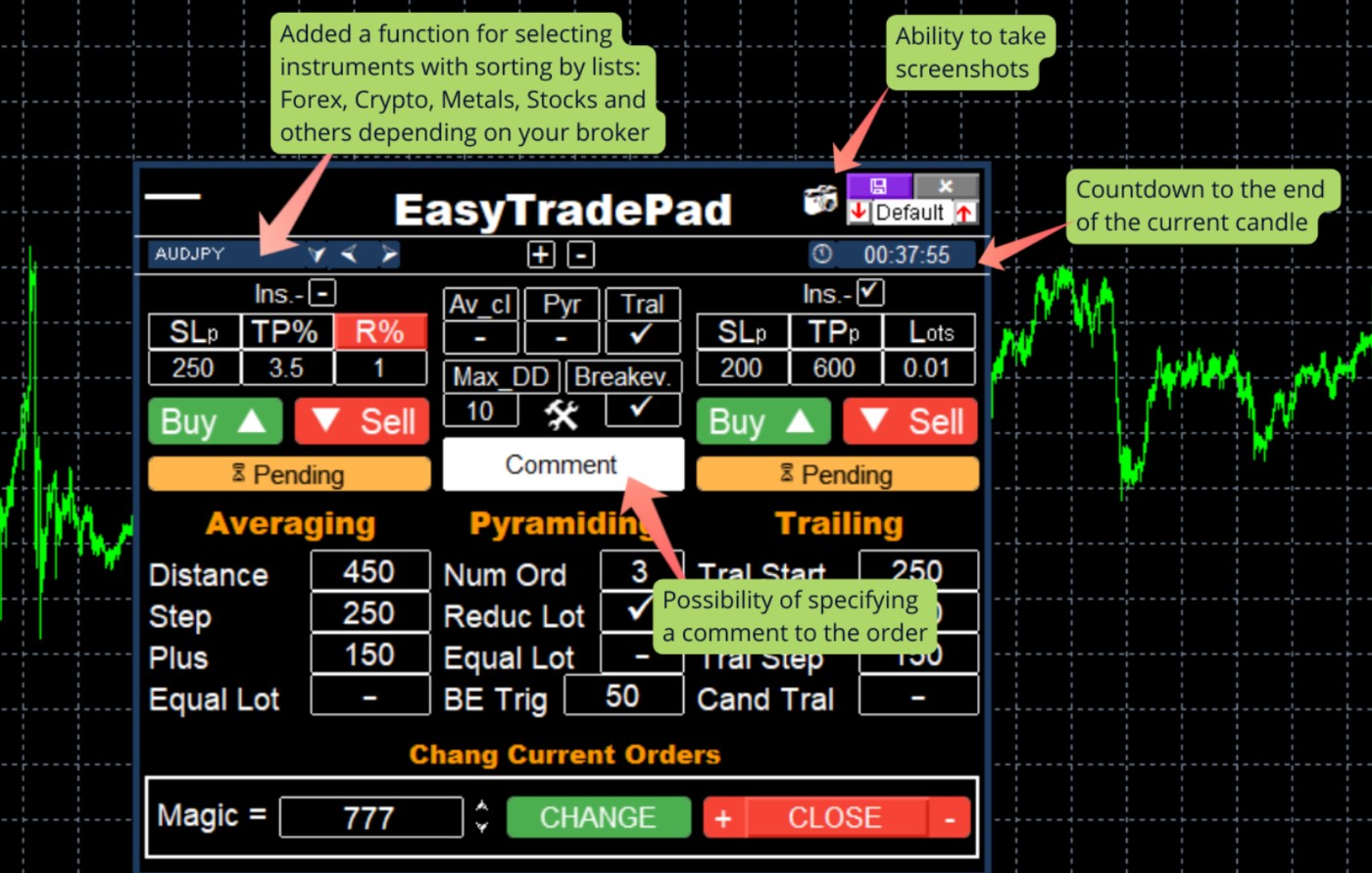
EasyTradePad is a trading panel for manual and semi-automatic trading that puts position handling, order management and money-management maths one click away — right on the chart.
Its core job is precise risk. You define exactly how much you are willing to lose and the panel computes the correct lot, calculating Stop Loss and Take Profit in points, in dollars, or as a percentage of the deposit, and showing the profit-to-risk ratio before you commit. No more spreadsheet before every trade.
Beyond the entry, the panel manages the whole life of a position. Move the Stop Loss to breakeven once price has travelled a set distance, add to a winning trade along the trend with pyramiding (optionally reducing risk on each added order), average an entry to smooth volatility, and lock in gains with a trailing stop measured in points or by candle shadows.
It is available for both MetaTrader 4 and MetaTrader 5 on the MQL5 Market, where you can also try the demo before buying. A full step-by-step instructions guide is available in the Guides section.
Features
- ✓Open a trade with the exact risk you specify
- ✓SL / TP in points, in dollars, or as a % of the deposit
- ✓Automatic profit-to-risk ratio calculation
- ✓Pyramiding — staged add-ons toward TP with optional risk reduction
- ✓Averaging with entries closed at the average price
- ✓Move to breakeven after a configurable trigger distance
- ✓Trailing stop in points or by candle shadows
- ✓Works on MetaTrader 4 and MetaTrader 5
How it works
- 1Attach EasyTradePad to a chart; the panel appears with entry, risk and management controls.
- 2Set your risk (points, $, or % of deposit) — the panel sizes the lot and previews SL, TP and the reward-to-risk ratio.
- 3Open the trade in one click; from there manage it with breakeven, averaging, pyramiding and trailing-stop controls.
- 4Fine-tune each feature in the settings, or switch off the ones you don't use (e.g. averaging) for a cleaner workflow.
Who it's for
- Discretionary traders who want exact, repeatable risk on every manual trade.
- Scalpers and intraday traders who need fast one-click entries and management.
- Traders who like to scale in with pyramiding or averaging under clear rules.
Requirements
- MetaTrader 4 or MetaTrader 5 terminal
- A broker account (demo or live)
- Allow the utility in terminal settings
Before you buy
- EasyTradePad is a manual/semi-automatic panel — it assists your decisions, it is not an automated signal system.
- Try the MQL5 demo first and read the Guides walkthrough to learn the money-management inputs.
- Averaging and pyramiding add exposure — configure their limits to match your account before using live.
Questions & answers
How do I get it?
It is distributed through the MQL5 Market, which handles purchase, licensing and updates. Open the listing with the buttons above.
Which platforms does it run on?
It runs on MetaTrader 4 & 5. Buy and license it through the MQL5 Market.
Can I try it before buying?
Most products on the MQL5 Market include a free demo you can run in the MetaTrader Strategy Tester before you buy.
How do updates work?
Updates are delivered automatically through the MQL5 Market to your purchased copy.
Can I ask a question before buying?
Yes — message me directly on Telegram and I'll help you decide whether it fits your setup.
New to MetaTrader?
Have a question?
The fastest way to reach me is Telegram — I read messages there myself. You can also follow my work on YouTube and find my products on MQL5.
Related guides
Related products
RiskTradePad
A trading panel with a risk-first workflow: size positions by risk before placing orders on MetaTrader.

Risk Manager
Automatic account protection — it enforces your loss and exposure limits while you trade.
Follow AlgoTrader Sergey on Telegram
Product updates, new releases and trading notes — straight from me.